One system for your business. Built by agencies, designed for digital professionals.
The operating system for agencies and digital professionals: marketing and advertising agencies, content creators, developers, and consultants. Centralize clients, projects, content, and results to reduce tools and duplicate work.
Replace the marketing tasks you do with Claude, ChatGPT, and Gemini with AI that has your clients’ context. The more context you add, the more tailored its suggestions can be. You review and decide.
3 FREE clients · No credit card · 15 days with all features
AI with context, fewer tools
The operating system for agencies and digital professionals: marketing and advertising agencies, content creators, developers, and consultants. Centralize clients, projects, content, and results to reduce tools and duplicate work.
Replace the marketing tasks you do with Claude, ChatGPT, and Gemini with AI that has your clients’ context. The more context you add, the more tailored its suggestions can be. You review and decide.
Connect to your favorite AI
- Coming soon




Features for agencies and digital professionals
For marketing and advertising agencies, content creators, developers, and consultants: manage clients, projects, and content, and understand your business profitability.
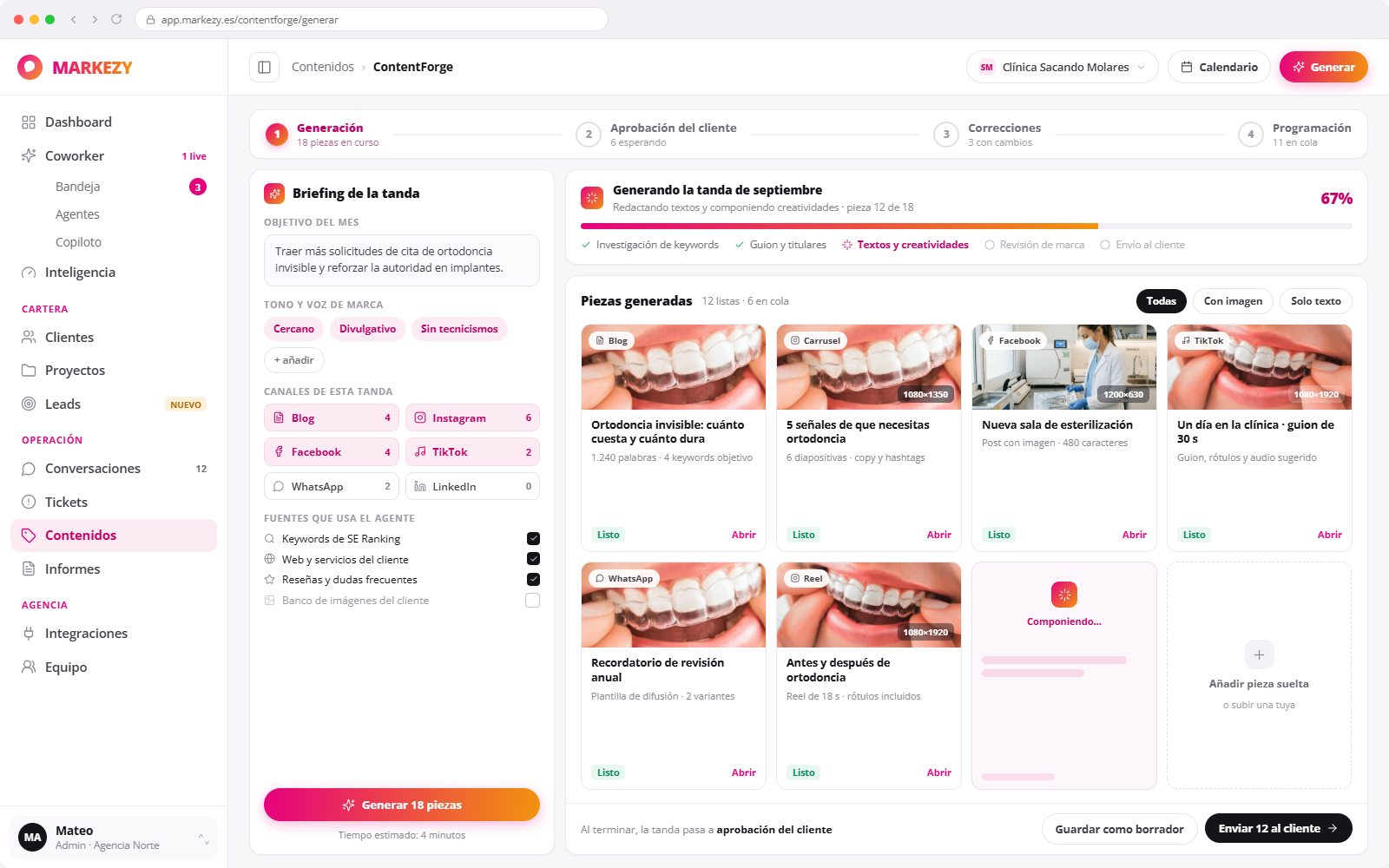
Your AI companion for every client, every project, and every decision.
Copilot is at your fingertips, using the context of your work and each client to help you at every stage: it answers questions, explains its reasoning, prioritizes what matters, and suggests the next step. You stay in control and decide what gets done.
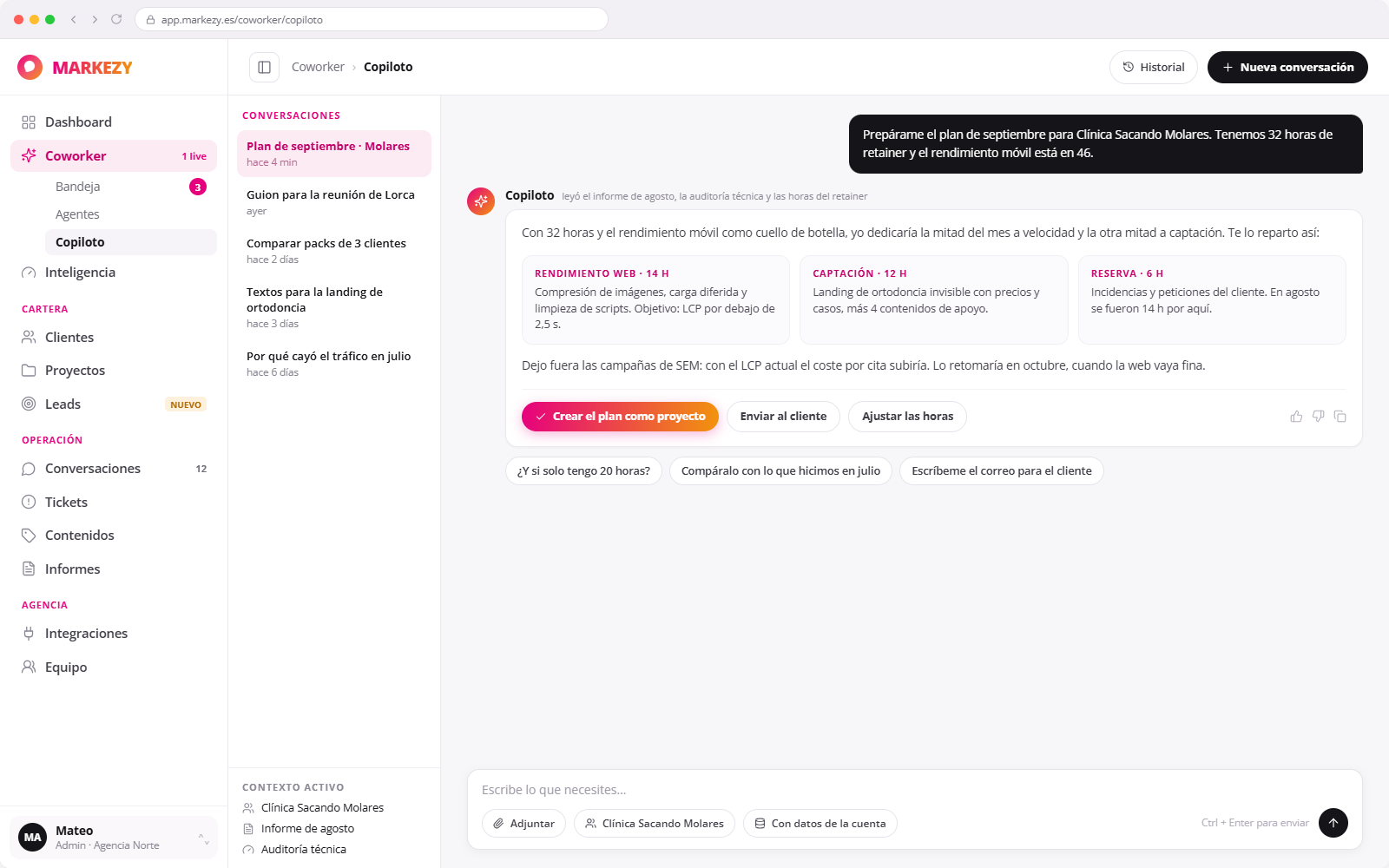
Activate each client with a step-by-step onboarding process
- Setup wizard with 5 steps: details, goals, services, access, and kickoff.
- Selection of contracted services: SEO, SEM, Social Media, Content, Web Design.
- Progress visible at all times for you and your client.
- Automated kickoff meeting when setup is complete.
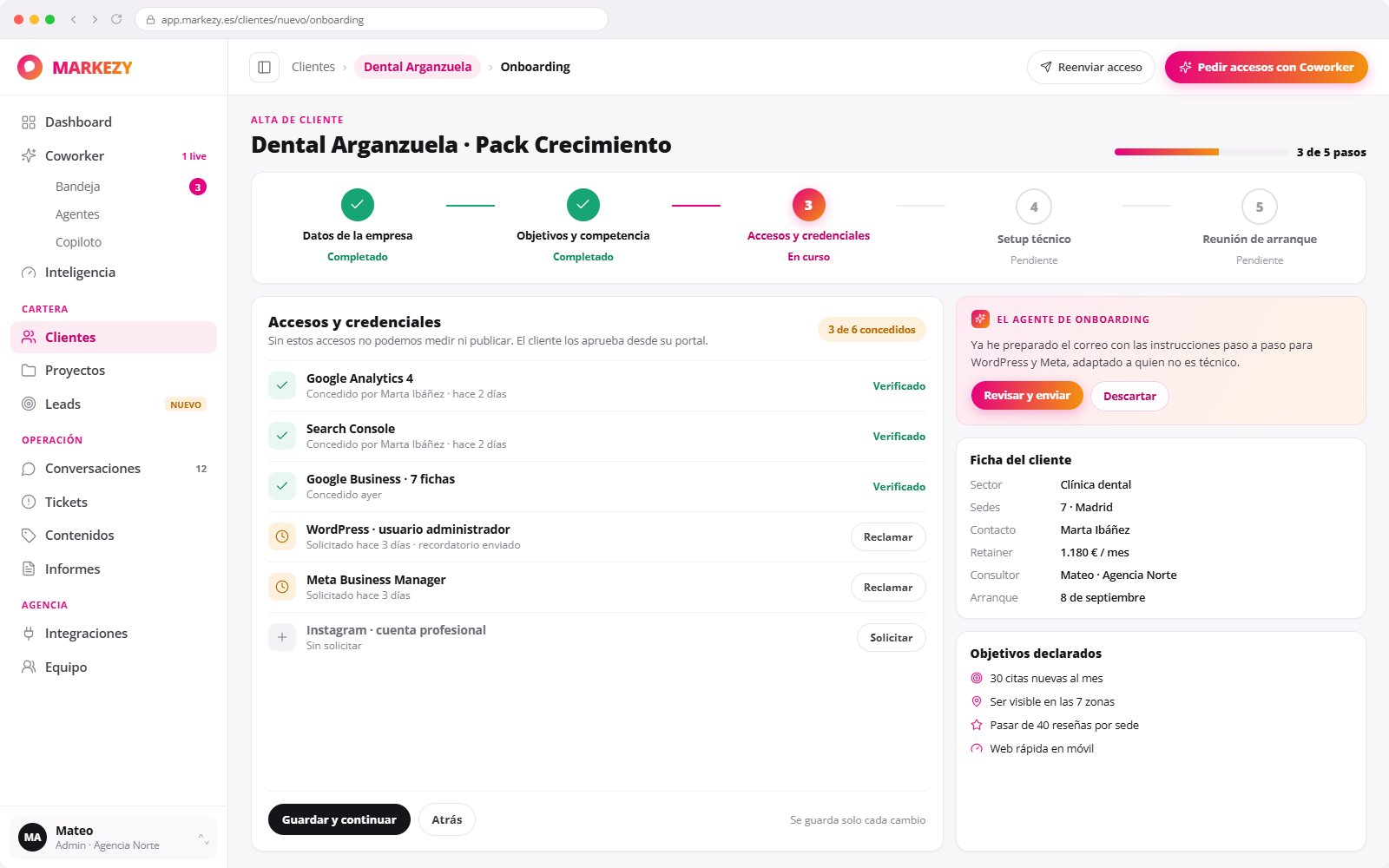
A portal that makes the value of your work visible
- Project status, milestones, and priorities in a clear view for the client.
- Direct communication with the consultant, with messages, decisions, and shared files.
- Reports and deliverables accessible from one place, without getting lost in emails.
- Next steps always visible so the client understands what’s happening and what comes next.
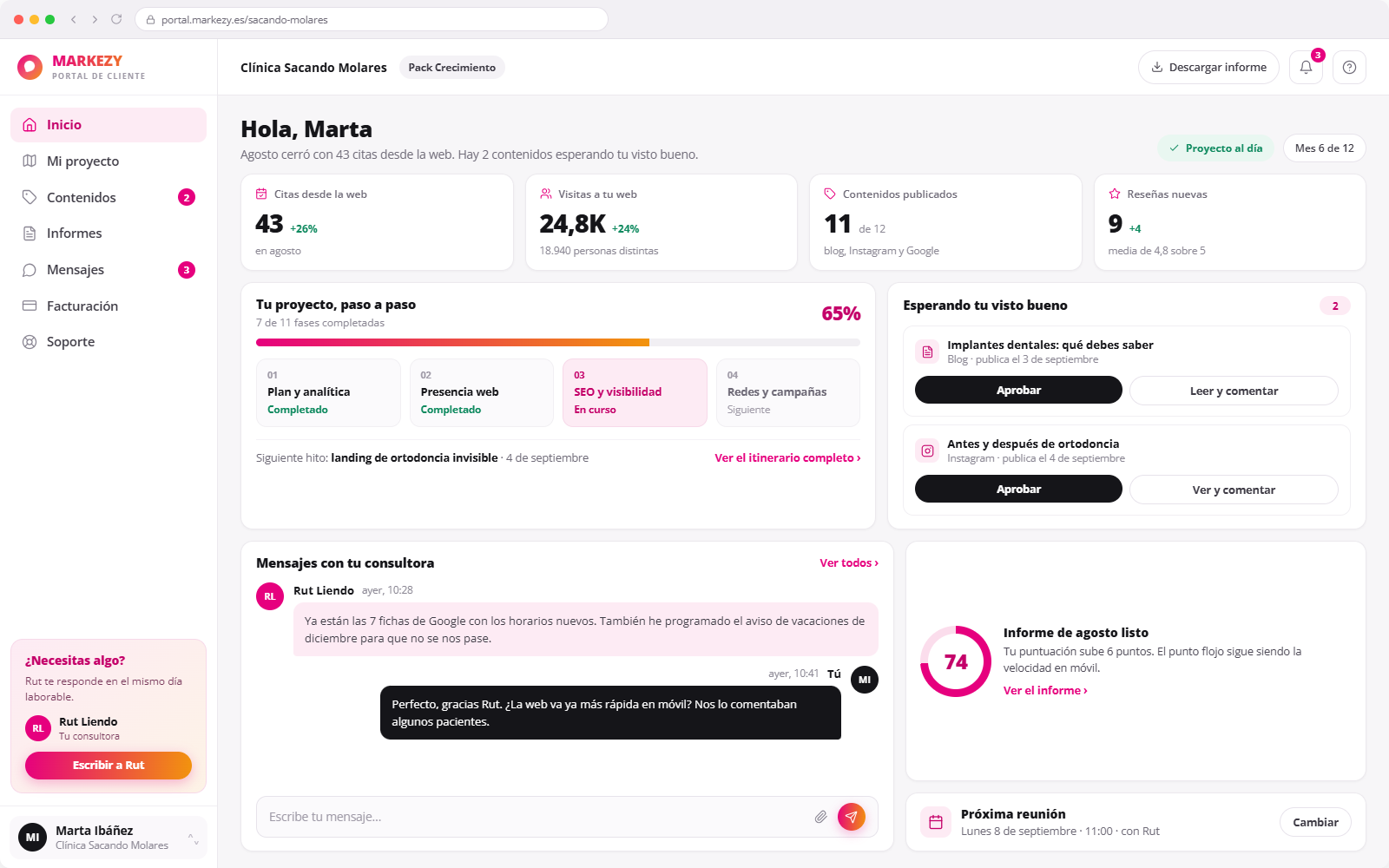
Editorial calendar and content from a single dashboard
- Generate, review, approve, and schedule all content for the month from a single editorial calendar.
- Clear statuses: published, in review, draft, scheduled.
- Real-time content statistics from the portal.
- The client reviews and approves directly from their dashboard.
GTM Engineer: from signal to follow-up.
Connect buying signals, prospecting, and follow-up with each client's context. You review the message and decide before contact is made.
- Paid plans: a minimum of 20 leads/month per client, based on their playbook and with a dedicated quota.
- Enterprise: 20 additional leads/month for your agency or freelance business, with a separate quota.
- More leads available at an additional cost in Starter, Professional, and Enterprise. FREE does not include this capability.
Leads are prospecting opportunities to review, not guaranteed sales or contracts.
Explore GTM and B2B Leads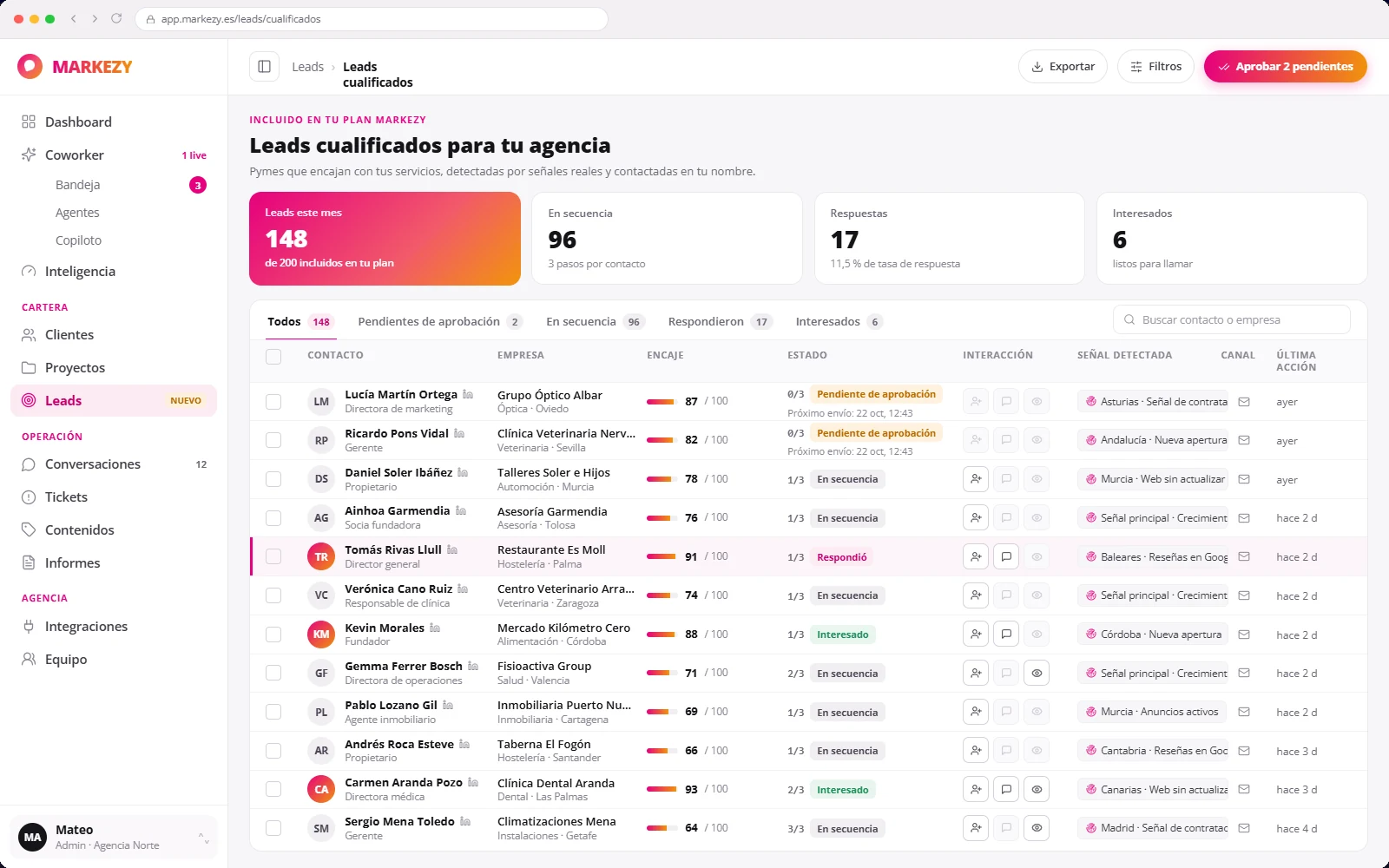
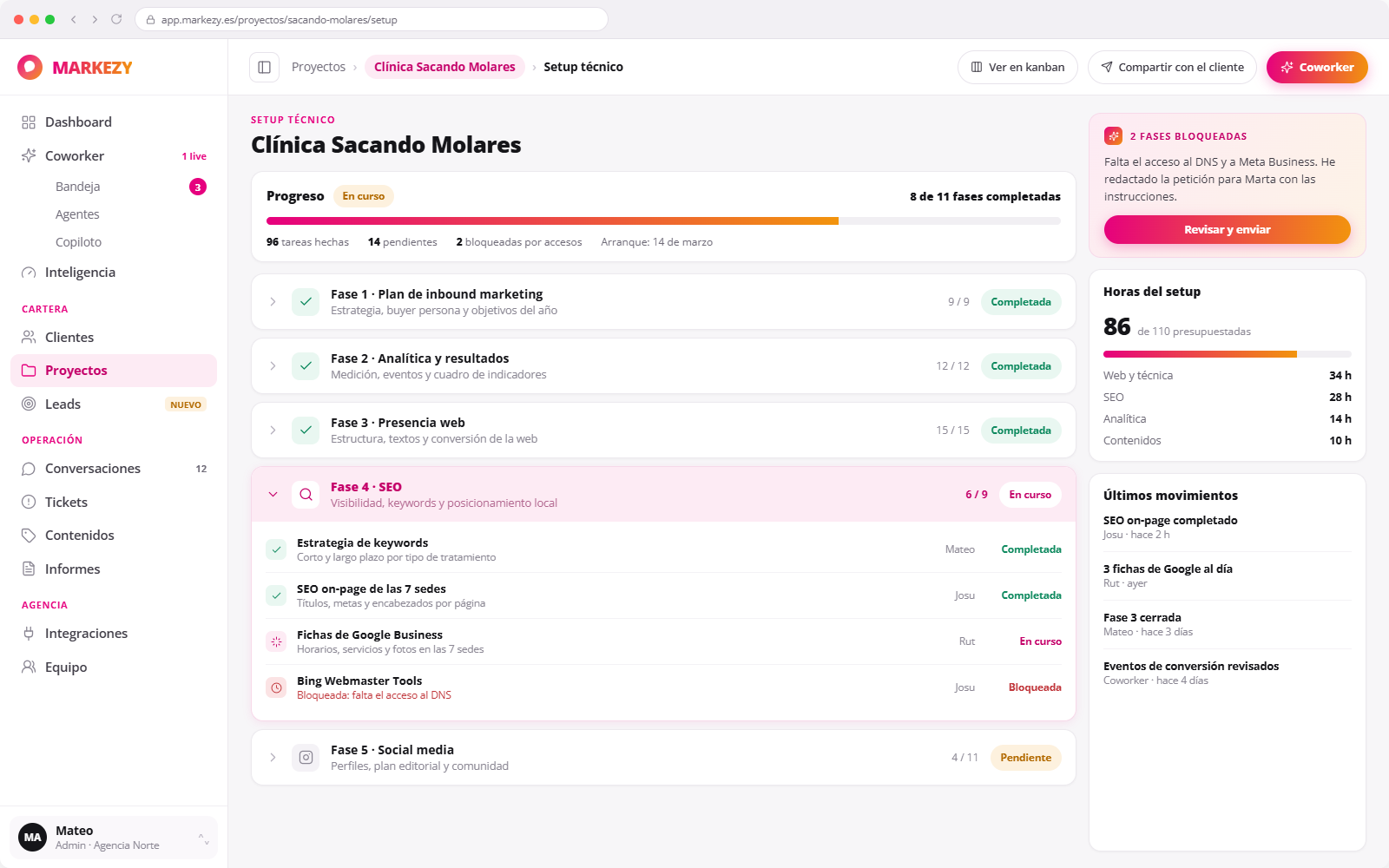
Your journey to digital success, phase by phase
- 7 visible project phases: Plan, Analysis, Web, SEO, Social, SEM, Optimization.
- Real-time progress with percentage and completed phases.
- Kanban view for each phase with detailed tasks.
- The client sees exactly where their project stands.
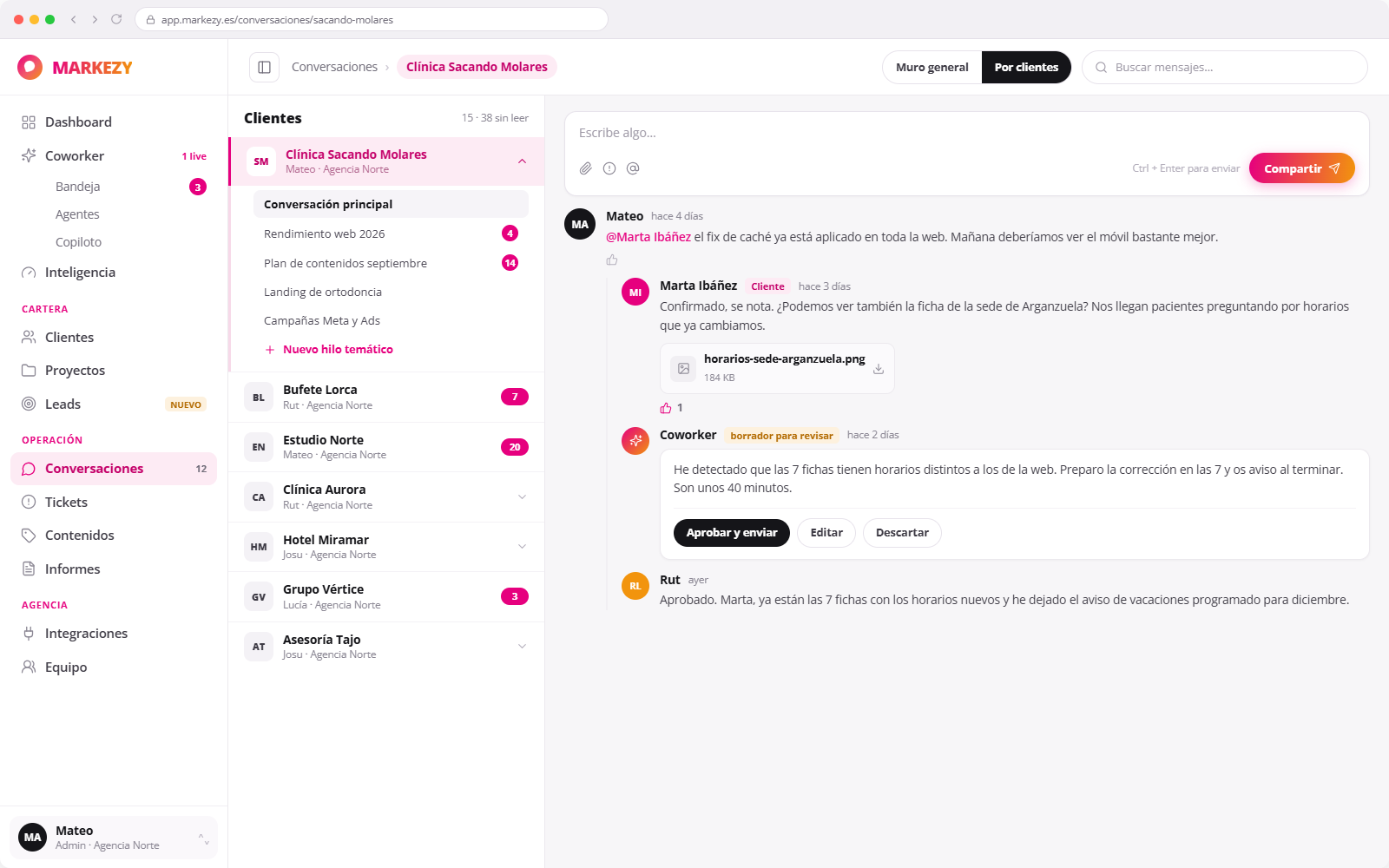
A project chat for everyone involved
- Direct conversation between the consultant, the client, and everyone involved in the project.
- A working channel that replaces email, WhatsApp, Slack, and scattered conversations.
- Files, decisions, questions, and deliverables always linked to the project.
- Complete history and real-time notifications so no one loses context.
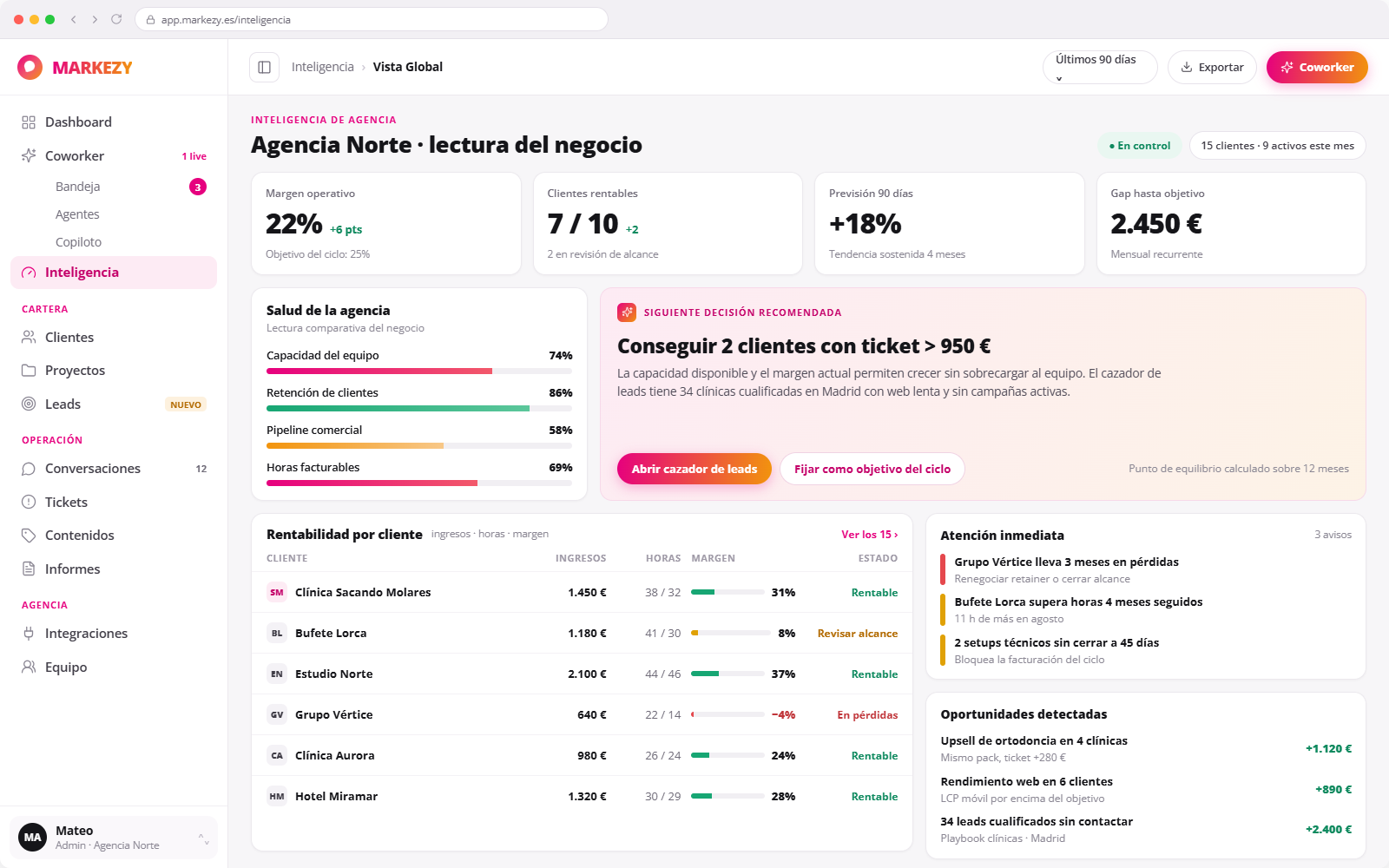
Agency Intelligence to see where to improve margins
- Profitability by client: revenue, effort, costs, and margin in one clear view.
- Overall business health: capacity, productivity, retention, and sales pipeline.
- Forecasts for the coming months, break-even point, and new clients needed.
- Actionable recommendations to prioritize decisions and build a profitable business.
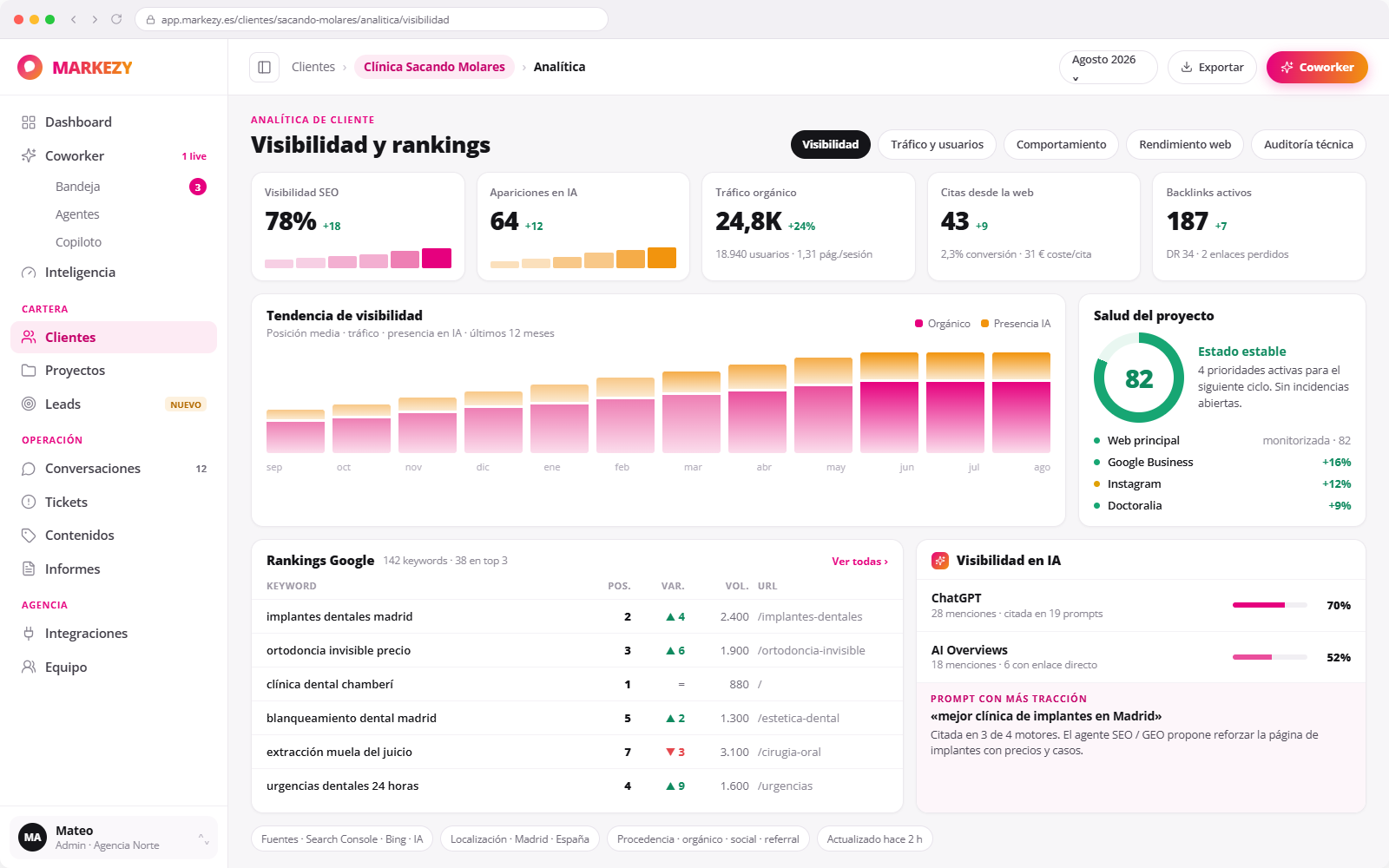
Digital Visibility to understand each client's growth
New module- SEO/GEO visibility, rankings, and appearances in AI search experiences.
- Traffic, origins, sources, locations, and trends in a shared view.
- Backlinks, project status, and the evolution of key digital assets.
- Website, Google Business, and major social networks monitored from the portal.
A full month of work, in a report your client understands
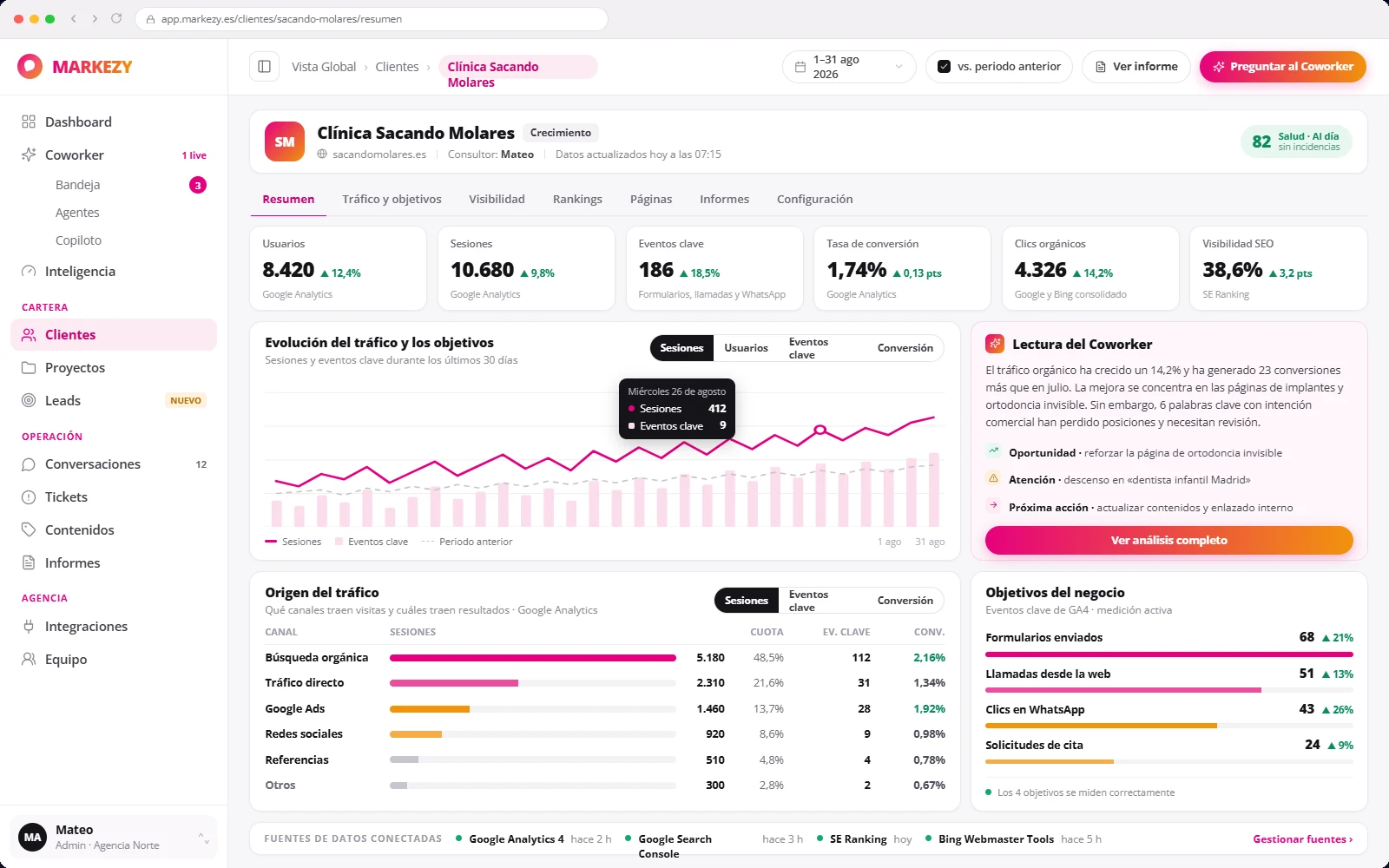
Not just what has changed in the data. Also what you have done to achieve it and what you will work on together next. Reporting brings both perspectives together in a report configurable for each client.
- Connect the leading data sources to bring traffic, behavior, social media, visibility, and rankings together in one report.
- Show the work you have completed, too: content, tasks, deliverables, and operations for the month, alongside decisions and next steps.
- Configure the reporting period, metrics, and sections to explain what matters to each client, without sending a collection of separate dashboards.
- Share the report regularly in their Client Portal: results and completed work together, so they know what work is being done for them.
Connected sources for the report
- Google Analytics 4
- Google Search Console
- Bing Webmaster Tools
- Redes sociales
- Microsoft Clarity
- SE Ranking
Authorized sources and recorded activity for each project come together to explain results in context.
Save on tools and get much more
MARKEZY grew out of hands-on digital marketing work and is built for agencies and digital professionals. It is designed to cover approximately 90% of the typical functions of a digital marketing stack, reducing context switching and keeping only what truly adds value.
SEO and visibility
Social media and content
Projects and tasks
Communication and collaboration
Analytics and marketing
GTM and B2B prospecting
Click any tool to see which features MARKEZY covers and which parts can stay connected depending on your configuration.
MONDAY · 08:30 · FIRST COFFEE
You don’t start the week trying to remember. You start knowing.
Start every Monday knowing exactly what to do.
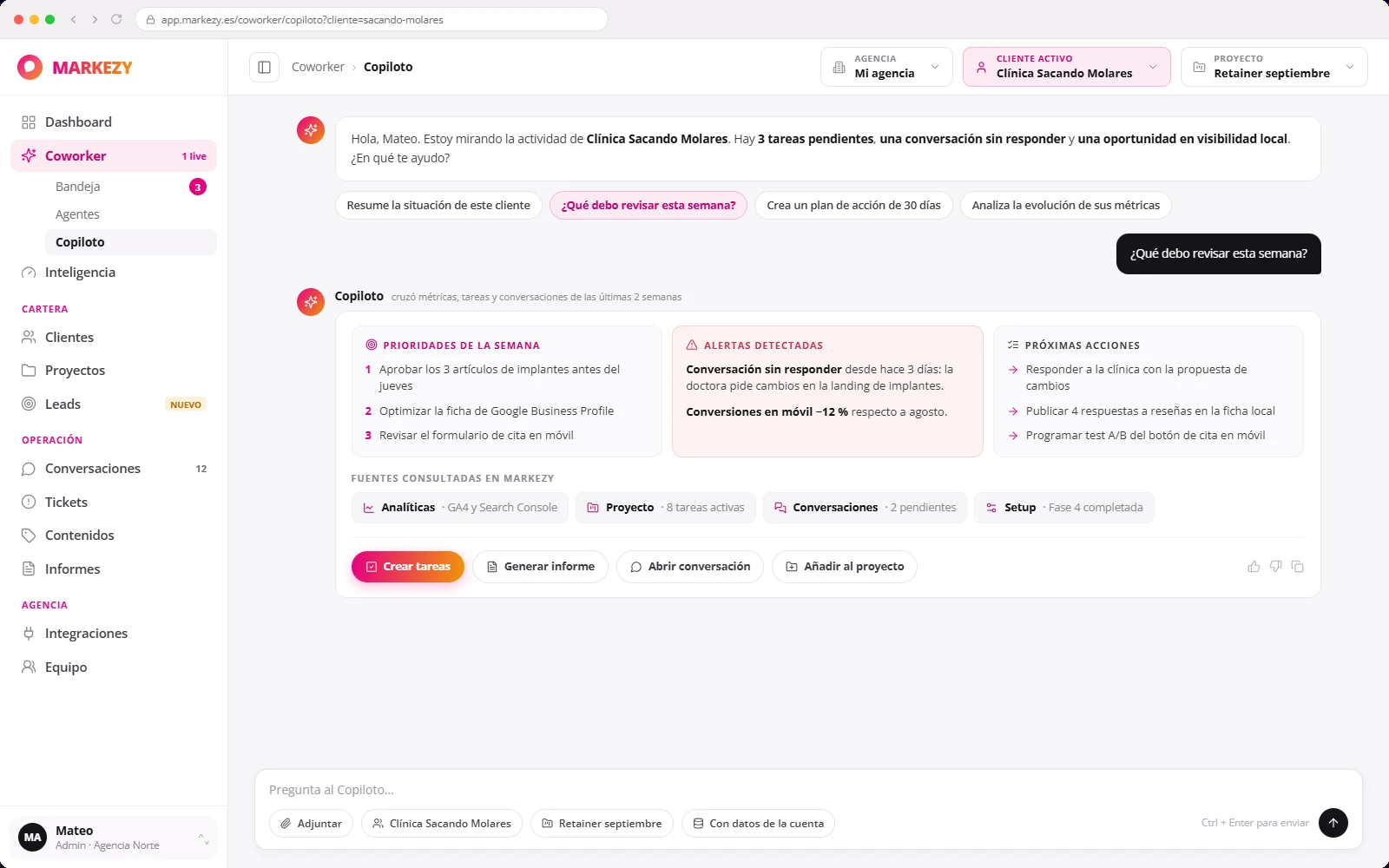
Copilot reviews the context of your activity and, in a few seconds, delivers the overview you need to start the week without wasting time.
How your business is doing, what takes priority, and the next step for each client.
- How your business is doingA quick overview of clients, projects, content, and visibility.
- What takes priorityThe accounts and tasks that need attention first, with their urgency levels.
- What you need to doClear next steps to start the week without wasting time or opening twenty tabs.
How MARKEZY works
From idea to results in 5 steps. No complications, no learning curve.
Sign up and choose your plan
Create your account in under 2 minutes and start with the FREE plan, free forever. Then choose the tier that best fits your business.
Set up your business
The onboarding assistant guides you step by step: company details, goals, services, access, and a kickoff meeting with your consultant.
Add your first client
Invite your first client, fill in their goals, and connect the context needed to get started with a real account.
Manage day-to-day operations
Manage projects, tasks, owners, deliverables, and communication from a single operational workspace.
Scale with results
Deliver automated dashboards and reports, understand your productivity, and scale with data-driven decisions.
The FREE plan is free forever for up to 3 clients; you can expand capabilities when your business needs it.
Sign up for FREE foreverA synthetic agent that works for your business 24 hours a day.
Like bringing in a digital marketing consultant for all your clients: COWORKER handles daily operations, gets tasks and deliverables ready, and waits for your team's approval before activating any action.
Coming soon · Available as an advanced module
Operations dashboard · COWORKER AI
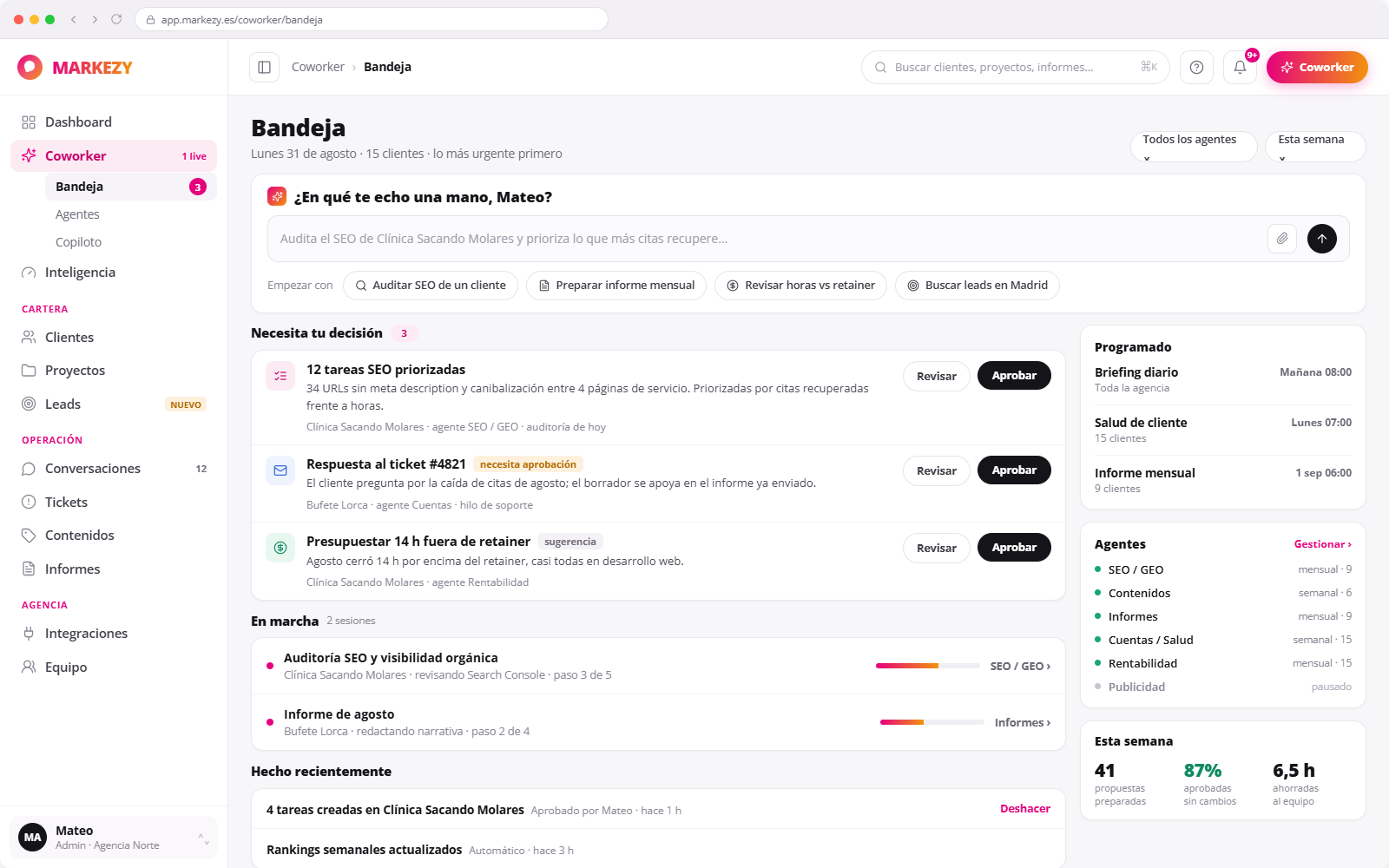
Signal
Issue detected
Work ready
Work prepared
Approval
Your control
Start with a FREE account
Get your business up and running from one place.
Integrations with your favorite tools
MARKEZY connects with the tools you already use to centralize your operations.
Explorar IntegracionesWork and knowledge
CRM and sales
Billing and administration
Visibility and campaigns
Analytics and measurement
Channels and conversations
And more connections to work with your actual ecosystem: from social media and messaging to CRM, billing, and automation.
Plans that scale with you
Start free forever and scale with a platform that connects operations, analytics, and business growth.
FREE
Free forever
Start free and organize your operations
Up to 3 clients
1 user included · +€19/month per additional user
Communicate privately with your agency’s collaborators and consultants in an internal space, separate from the Client Portal and your client conversations.
Create and organize your clients’ marketing plans in Markezy to guide your agency’s work.
Assess each client’s website visibility and technical status when you start working with them and in subsequent reviews to track progress.
Starter
Organized operations
The complete foundation for managing clients
Up to 5 clients
1 user included · +€19/month per additional user
A minimum of 20 leads per month per client, based on their initial playbook. Each client has their own quota. Expandable at an additional cost. 5.000 FREE credits per managed client, renewed every month. 1 LinkedIn user per managed client. Prospect data enrichment. These are prospecting opportunities, not guaranteed sales.
Communicate privately with your agency’s collaborators and consultants in an internal space, separate from the Client Portal and your client conversations.
Create and organize your clients’ marketing plans in Markezy to guide your agency’s work.
Assess each client’s website visibility and technical status when you start working with them and in subsequent reviews to track progress.
Professional
Strategic growth
More capacity to sell and demonstrate value
Up to 15 clients
1 user included · +€19/month per additional user
A minimum of 20 leads per month per client, based on their initial playbook. Each client has their own quota. Expandable at an additional cost. 5.000 FREE credits per managed client, renewed every month. 1 LinkedIn user per managed client. Prospect data enrichment. These are prospecting opportunities, not guaranteed sales.
Communicate privately with your agency’s collaborators and consultants in an internal space, separate from the Client Portal and your client conversations.
Create and organize your clients’ marketing plans in Markezy to guide your agency’s work.
Assess each client’s website visibility and technical status when you start working with them and in subsequent reviews to track progress.
Enterprise
Scale with control
Control and capacity for an established business
Up to 25 active clients · introductory offer
3 users includeds · +€19/month per additional user
20 leads per month to acquire clients for your agency or freelance business. This quota is separate from your clients’ quotas. Expandable at an additional cost. These are prospecting opportunities, not guaranteed sales.
Use them at any time during the six months for technical support, website optimization, security hardening, hosting migrations, GTM setup and tagging, personalized mentoring, and other support services. Renews every six months from Enterprise activation as long as you keep the plan. Unused hours expire at the end of each period and do not roll over.
A minimum of 20 leads per month per client, based on their initial playbook. Each client has their own quota. Expandable at an additional cost. 5.000 FREE credits per managed client, renewed every month. 1 LinkedIn user per managed client. Prospect data enrichment. These are prospecting opportunities, not guaranteed sales.
Communicate privately with your agency’s collaborators and consultants in an internal space, separate from the Client Portal and your client conversations.
Create and organize your clients’ marketing plans in Markezy to guide your agency’s work.
Assess each client’s website visibility and technical status when you start working with them and in subsequent reviews to track progress.
Copilot teaches and guides. COWORKER works and waits for your approval.
Copilot is always with you to suggest, teach, and share ideas; COWORKER adds an operational layer that works and prepares deliverables, always subject to human approval.
COWORKER AI
An AI agent working 24 hours a day.
Works and operates for your business as a digital marketing consultant for all your clients, leaving every task and deliverable awaiting human approval.
Professional services
WordPress specialists when you need them.
Starting with FREE, you can activate specialized support for maintenance, security, performance, plugins, themes, Elementor, migrations, and WooCommerce. Request it through the platform and see the cost before confirming.
View examples and indicative pricing
Indicative amounts, subject to scope and agency confirmation before purchase.
Leads, tokens, and integrations, with no fine print.
Learn how each plan's limits work and which capabilities are activated when you move from FREE to a paid subscription.
Does the lead allocation apply to each client?
Starter, Professional, and Enterprise include a minimum of 20 leads per month for each client you manage, based on their initial setup playbook. Each client has their own allocation: it is not a shared pool across your entire client portfolio. Prospecting is based on up-to-date signals reviewed across hundreds of databases. It generally delivers more prospects with each scheduled prospecting run; the included minimum remains 20 leads/month per client, with no guarantee of a higher volume. FREE does not include this capability.
What is the difference between leads for my clients and leads for my agency?
Enterprise also includes 20 leads per month to acquire new clients for your own agency or freelance business. This is a separate allocation: it is not deducted from the leads included for each client you manage. Leads are prospecting opportunities to review, not guaranteed sales or contracts.
Can I increase the number of leads?
You can increase the number of leads at an additional cost on Starter, Professional, and Enterprise. On Enterprise, you can expand both prospecting for your clients and client acquisition for your own business. Additional leads are not available on FREE; review the terms and cost before purchasing.
Are included credits allocated per client and renewed every month?
Starter, Professional, and Enterprise include 5.000 FREE credits per managed client, renewed every month. These credits are allocated per client, not pooled across your entire client portfolio.
How many LinkedIn users are included?
Starter, Professional, and Enterprise include 1 LinkedIn user per managed client.
Is prospect data enrichment included?
Starter, Professional, and Enterprise include prospect data enrichment.
What does unlimited module use during the 15-day trial mean?
During the 15-day trial, you can use the GTM module without limits. This refers to module use, not unlimited external services or a guaranteed volume of leads or results. FREE is a permanently free plan, separate from the 15-day trial. The leads module is not part of the permanent FREE plan. The benefits and per-client allowances described apply to Starter, Professional, and Enterprise.
Are the 10,000 COWORKER tokens per user?
No. The 10,000 monthly tokens are allocated per agency and shared flexibly among licensed users and consultants, with no fixed allocation per person.
What happens if the agency exceeds its token allowance?
Capacity can be expanded automatically when the limit is reached, but confirmation from the agency manager is required before the expansion is applied.
Which integrations are included in paid plans?
Paid plans include integrations with CRMs such as Odoo and Clientify, invoicing software such as Holded, Sage, and Odoo, and marketing automation with HubSpot, Clientify, Brevo, and Mailchimp, subject to availability and configuration.
Do free plans include these integrations?
No. Free plans let you get started with essential operations, but CRM, invoicing, and marketing automation integrations are reserved for paid plans.
Next step
Discover how MARKEZY organizes your business into one system.
On-demand services
Purchase additional resources directly from MARKEZY. Each service is billed based on usage.
Lead Generator
Qualified contact generation by industry, location, and profile.
Credit-basedManaged Hosting
Web hosting, SSL, backups, monitoring, and maintenance.
From €9/monthTechnical Support
Tickets for development, issues, migrations, and technical changes.
HourlyExpert Mentoring
Sessions with specialists in SEO, Ads, strategy, sales, and more.
Per sessionSales Closer
Sales closing service for your qualified leads.
Per closeCreative Production
Design, video, photography, and creative assets on demand.
Per projectExclusive program
Want to build your agency with a ready-to-use system?
Explore the partner program, guidance, and resources MARKEZY provides to help you run a more organized operation.
Frequently Asked Questions
Everything you need to know about MARKEZY before getting started.
What is Markezy?
Markezy is the operating system for agencies and digital professionals. It centralizes clients, projects, tasks, content, communication, reports, digital assets, and AI with each client's context to help you work more efficiently, reduce external tools, and improve operational efficiency.
Who is Markezy designed for?
For marketing and advertising agencies, content creators, developers, and consultants who need to manage their operations and client relationships. Each business maintains its identity, processes, and control over its own client relationships.
What does the platform include?
Markezy includes client and consultant management, projects, Setup and onboarding, tasks, content, reports, communication, documentation, dashboards, Client Portal, digital assets, automations, and Copilot in every plan. Copilot provides context, guidance, and suggestions, and helps prioritize daily work. Professional and Enterprise also include COWORKER AI, limited to 10,000 tokens per month: it works and operates for your business, leaving tasks and deliverables pending human approval.
Can Markezy replace other tools I use?
Yes. Markezy brings together management, content, conversations, Client Portal, visibility, and AI with each client's context. It can replace marketing tasks you currently spread across tools or perform with Claude, ChatGPT, and Gemini, so you don't have to repeat information from scratch. Review the features and connections you use before canceling a subscription: it does not replace every use of a general-purpose AI or guarantee savings or results.
Does Markezy include Artificial Intelligence?
Yes. Copilot is included in every plan and uses the context of your operations to help you understand what to do, how to do it, and which tasks to prioritize each day for each client. Copilot suggests, teaches, and provides ideas, but does not execute on its own. Professional and Enterprise also include COWORKER AI, limited to 10,000 tokens per month: it works and prepares tasks and deliverables, always awaiting human approval before triggering any action.
Will my clients also have access?
Yes. Each client can have a private Client Portal where they can view project progress, content, documentation, conversations, reports, and key metrics. You maintain control of the relationship and decide which information and features to show each client.
Can I use Markezy with my own brand?
Yes. You can use Markezy while maintaining your own identity, business relationships, and control over your clients. Each account operates in a separate space, with isolated permissions and data: MARKEZY does not use or share client information across accounts.
How do I sign up for Markezy?
You can create your account using the Try it now button, which takes you to https://app.markezy.es/register. Start with 3 FREE clients, no credit card, and 15 days with all features. Then choose the plan that fits your operations and review its limits and conditions. Professional allows up to 15 clients; additional users, AI, or modules are discussed based on your business needs.
Are there additional services beyond the software?
Yes. Markezy is evolving into an ecosystem that combines software, AI, and professional services. Services such as hosting, technical support, opportunity generation for your clients, mentoring, specialists, freelance production, and sales support will gradually become available to purchase directly through the platform.
Are my data and my clients' data protected?
Yes. Markezy uses a multi-tenant architecture with separation by roles and permissions, authentication, encryption in transit and at rest, and specific access controls. The infrastructure also includes automated, encrypted backups and external replication, along with dedicated contingency and incident recovery procedures.
Responsible AI and human oversight
How does Markezy help you use AI more responsibly?
Markezy brings your work and each client’s information together in one environment. This lets you apply AI with more context, control, and oversight, preventing briefs, content, campaign data, or documents from being scattered across separate accounts and tools.
Does Markezy keep each client’s information separate?
Yes. Markezy is designed to organize work by client: their projects, documentation, conversations, content, metrics, and processes. This lets you work with more organized context and reduce the operational risk of mixing information across accounts.
What does Markezy add compared to using ChatGPT, Claude, or Gemini individually?
General-purpose tools are very powerful, but they are not designed to manage the day-to-day relationship between a professional or team and all their clients. Markezy adds the operational layer: client-specific context, permissions, collaboration, process traceability, and human review within the workflow itself.
Does Markezy help you prepare for the EU AI Act?
Markezy does not replace legal advice or promise automatic compliance certification. It does help agencies and digital professionals work with a foundation better prepared for an increasingly demanding AI environment: organized information, permissions, traceability, collaboration, and human oversight.
Can clients participate in reviewing AI-generated content?
Yes. With features like ContentForge, you can create, review, comment on, version, and request client approval for content before publishing. This improves the quality of the work, prevents errors, and makes it clear that the final decision remains human.
Does AI replace your professional judgment?
No. In Markezy, AI is designed to accelerate analysis, creation, and execution, not to replace professional judgment. You remain in control of decisions, deliverables, and the client relationship.
Have more questions?
Contact the teamThe operating system for
agencies and digital professionals
Start with FREE forever and discover how MARKEZY can help you manage your business and your clients.